What is OSINT? A plain-English explainer (with the tools investigators actually use)

OSINT is one of those acronyms that sounds more technical than it is. Strip away the jargon and it means finding out things using sources anyone can access. No insider tip-offs, no leaked credentials, no hacking — just patience, lateral thinking, and a small toolkit of websites and software. The skill is less in any individual tool than in knowing what to pull on next.
The acronym comes from the intelligence community. Open Source Intelligence was originally the discipline of pulling actionable info out of newspapers, broadcast TV, academic journals — anything that wasn't classified or under embargo. The Cold War-era CIA had a whole department for it; the modern descendant is still funded as a programme inside the US Office of the Director of National Intelligence. What changed in the last twenty years is that "open source" now mostly means the internet, which is somewhere between everything-and-nothing-ever-deleted depending on which corner you look in.
Who actually does OSINT
The most visible practitioners right now are independent investigative outlets — Bellingcat is the canonical example. Eliot Higgins founded it in 2014 as a one-person blog called Brown Moses, working from his sofa. They proved the missile that brought down flight MH17 over Ukraine in 2014 came from a specific Russian military unit using nothing but social media posts, Google Earth imagery, and shadow-angle analysis from photos. They named the GRU officers who poisoned Sergei Skripal in Salisbury in 2018 using the same approach plus a Russian car-registration database that had leaked. They've since published exhaustive timelines of the Bucha massacre in Ukraine, the Saudi murder of Jamal Khashoggi, and dozens of less-headline-grabbing investigations that genuinely changed what's known.
But it's a much bigger group than just journalists. Police use OSINT to build evidence packs for prosecutions — most modern police academies now teach a basic OSINT module. Lawyers use it for due diligence on opposing counsel's witnesses, and for asset tracing in commercial disputes. Recruiters use it (badly, sometimes) to check candidate claims. Trace Labs runs OSINT capture-the-flag events where volunteers try to find leads on real missing-persons cases — the families consent, the leads go straight to law enforcement, and the events have generated tangible breakthroughs on cold cases. Security teams use it to map their own attack surface — what does our company look like from the outside, what credentials of ours have been pasted into pastebin, what email addresses can a phisher harvest about our staff. Genealogists use it to find living relatives. Insurance fraud investigators use it to disprove claims. And yes, plenty of normal-curious people use it to figure out why a stranger's username has shown up on three different platforms or where a photo someone sent them was really taken.
The democratisation matters. The same toolkit a journalist uses to fact-check a Putin claim is available — and free — to a small-town reporter, a domestic-abuse survivor trying to verify the identity of a stalker, or a high-school teacher running a "verify this image" lesson. The barrier is no longer access. It's knowing the technique.
What an OSINT investigation actually looks like
There's no single workflow but most jobs share four steps.
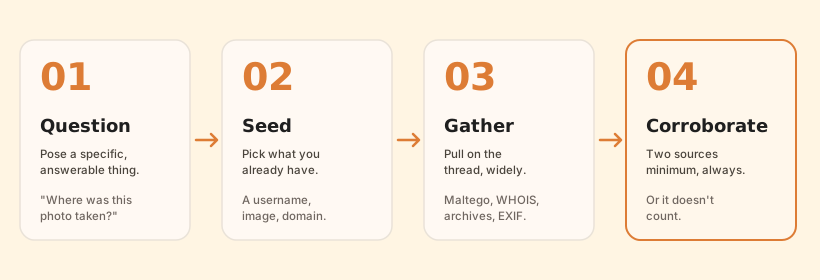
You start with a specific question — who is behind this account, where was this photo taken, did this company really exist in 2014, is this domain a phishing site, when did this person actually move to this city. Vague questions make terrible investigations; specific questions either get answered or get conclusively unanswerable, and either outcome is useful.
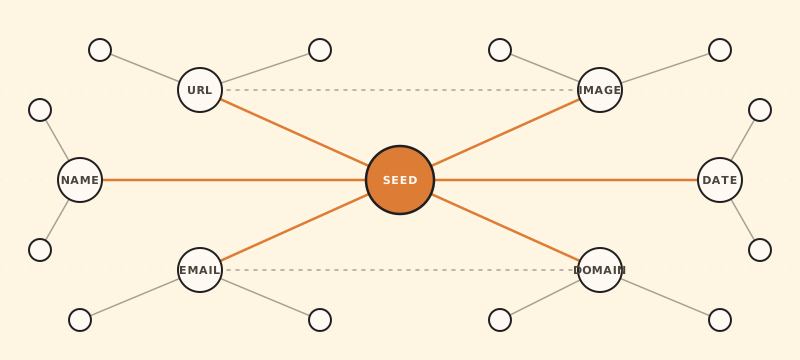
You pick a seed — usually a piece of information you already have, like a username, an image, a domain, an email address, a Telegram channel ID, a phone number. The seed is what the rest of the work radiates outward from.
You pull on the seed, gathering everything you can find that's connected to it. This is where the tools come in. WHOIS for a domain. Reverse image search for a photo. CDX search for past versions of a webpage. Sherlock-style username enumeration across platforms. EXIF extraction for a phone photo. The seed is rarely interesting on its own — what's interesting is what it touches.
Then you corroborate — at least two independent sources before you act on a finding. The Bellingcat house style is to publish only conclusions you can back up with the evidence chain laid out in the article itself, so a reader could reproduce the work. That's the bar. "I saw it on a Telegram channel" is not OSINT. "I saw it on a Telegram channel, the same photo appeared on a Russian VK page six hours earlier, and shadow analysis using SunCalc matches the claimed time and the geolocated street from Google Maps" is.
The mistake newcomers make is treating it like Google: type a thing, take the first result. Real OSINT is more like detective work in a library. You're cross-checking three or four sources for the same fact, you're keeping a working timeline (most investigators use a shared Google Doc or a tool called CherryTree to keep notes), and you're being honest with yourself when the evidence doesn't say what you wished it did.
The serious-tool layer
A few names come up over and over in OSINT communities. None of them are Buncha's — these are the heavy-hitters investigators actually use.
Maltego Community Edition is the big one for relationship mapping. You drop in an entity (a person, an email, a domain), and Maltego runs "transforms" that pull related entities from various sources, plotting them on a graph as you go. Click a domain, run a transform, see all the email addresses associated with it. Click one of those emails, run another transform, see what data breaches it's appeared in. The CE tier is free with usage caps; serious investigators pay for the commercial version which unlocks more transforms and removes the limits. It's the closest thing OSINT has to a unified workbench.
SpiderFoot is the automation side. Give it a starting target — a domain, IP, email, name, or phone number — and it'll run hundreds of modules against public data sources in parallel: WHOIS, DNS, certificate transparency logs, breach databases (HIBP, etc.), social-media presence enumeration, dark-web mentions, the lot. It comes back with a report and a graph. The open-source version is free, self-hosted, and runs anywhere from a Raspberry Pi to a cloud VM; SpiderFoot HX is the hosted commercial variant if you don't want to babysit infrastructure.
Shodan is a search engine for internet-connected devices. Where Google indexes the web, Shodan indexes what answers when you knock on every port of every IP. It's how researchers find unsecured webcams, exposed MongoDB databases, devices running known-vulnerable software, and industrial control systems that should not be on the internet. The free tier is limited but enough to learn on; the paid tiers unlock historical data and bigger result sets.
Hunchly is the evidence-capture tool. A Chrome extension that automatically records and cryptographically signs every page you visit during an investigation, so you can prove later that a page said what you claim it said. About $130/year. It's the standard for serious investigative journalism because it survives the "but they deleted the post afterwards" objection that otherwise kills cases — courts will accept Hunchly's signed bundles as evidence.
Hunter.io and similar email-finding tools take a domain and return the email pattern (e.g. firstname.lastname@) and any addresses that have leaked into public web pages. Useful for B2B sales the way it's marketed, useful for OSINT in a way that's less marketed.
The OSINT Framework isn't a tool, it's a directory — a sprawling tree of categorised free websites for specific tasks. Looking up a phone number? It has a section. Reverse image search options? Section. Username enumeration across social platforms? Section. Bitcoin wallet investigation? Section. It's the place to bookmark when you can't remember the URL for the niche tool you used last month.
And the Bellingcat Online Investigations Toolkit — a public Google sheet maintained by their team, with hundreds of entries grouped by use case (maps and geolocation, transport, archives, social media, environmental data, language analysis, satellite imagery sources). Free, updated regularly, and the closest thing OSINT has to a canonical reference. The "Maps & Geolocation" tab alone is worth bookmarking.
The classic Bellingcat shadow trick

Worth pulling out separately because it shows what skilled OSINT looks like in practice and ties together several of the tools above. Investigators often need to verify when a photo was taken, not just where. A photo posted today might be a year old. A photo claimed as evidence in a war crime could be from a different conflict.
Shadows are unforgiving. Given a known location and a known date, the sun's position is fixed — you can compute the shadow direction and length to within minutes. Bellingcat's technique: find the location of a photo (usually by reverse-image-searching landmarks until something matches a Google Street View frame, then comparing building geometry), then use a sun-position calculator to predict where shadows should fall on each candidate date. If the shadows in the photo match the claimed date, that's strong corroboration; if they're 90° off, the claimed date is wrong.
This is exactly the technique they used to date specific photos from the MH17 investigation, the Khashoggi murder, and various Syria-Russia documentation. The sun-position math is identical regardless of where on Earth you're working; the difficulty is geolocating the photo in the first place.
Where Buncha fits
Most of the tools above are heavy: install something, learn a new interface, in some cases pay a subscription. They earn their keep on serious investigations where the answer matters enough to invest in the workflow. But for the small everyday questions — who runs this domain, when did this site first appear, is this image edited, what does this email's header tell me about who sent it, where was this photo taken, where will the sun be at 5pm Tuesday at the location of this photo — opening Maltego is overkill. You want a single page, a single input, and an answer in 30 seconds.
That's the niche Buncha's OSINT category is going for. Tools you can use on a phone, on a borrowed laptop, in a coffee shop, without an account.
The seven currently in the OSINT category are:
- WHOIS / Domain Lookup — registrar, age, expiry, DNSSEC, status flags. RDAP under the hood, runs in the browser. Where does this domain live, when was it registered, when does it expire. The first thing to check on a suspicious URL.
- Email Header Analyzer — paste raw headers, get SPF / DKIM / DMARC verdicts and a parsed hop chain. For the "did this really come from who it says it did" question. Phishing-investigation gold.
- Reverse Image Search launcher — drop an image, launches across Google Lens, Yandex (the OSINT-community favourite for faces and unique scenes), TinEye (best for finding the earliest known appearance), Bing, and Baidu. Different engines see different parts of the web; the trick is running through several.
- Error Level Analysis — JPEG tampering sanity-check. Recompresses and highlights regions whose compression history doesn't match the rest of the frame. A 30-second sanity check, not forensic evidence.
- Wayback Machine Lookup — archive.org's snapshot history for any URL, year-by-year heatmap, direct links to view captures. Recovering 404-ed pages, tracking how a claim evolved, proving a page existed before someone says it did.
- Image Location Finder — EXIF GPS extraction first (most phone photos carry it, embedded by the camera at capture time), then an optional AI vision-guess fallback for photos without GPS. Honest about its confidence.
- Sun Position & Daylight — sunrise, sunset, golden hour, civil/nautical/astronomical twilight, plus a world map showing where the sub-solar point is right now. This is the shadow-analysis tool — feed it a date and location, get the sun's azimuth and altitude.
If a job grows beyond what these can answer, the answer is one of the heavier tools above. They're complementary, not competitive. The Bellingcat investigators reaching for Maltego still use a WHOIS lookup three times a day; they just use the WHOIS that's already integrated into Maltego rather than a separate web tool. For a smaller investigation that doesn't justify the integration setup, the standalone version is faster.
The ethics line, because someone is going to ask
OSINT is information that is already public. Working with it doesn't make you a hacker, a stalker, or a vigilante. But the same techniques that find a missing person can be used to dox someone for a forum dispute, and the same skill that traces a phishing campaign can be turned against a domestic-violence victim trying to disappear from an abuser. The discipline gives you real leverage; how you use it is on you.
Most active OSINT communities have explicit codes of practice — the Bellingcat handbook, the SANS OSINT guidelines, the Trace Labs rules of engagement. The short version of all of them:
- Collect only what's needed for the question you started with. Scope creep is how investigations turn into harassment.
- Corroborate before acting on findings. Especially before publishing anything that identifies a person.
- Don't publish identifying details about uninvolved third parties — a phisher's sister-in-law is not a public figure just because her name showed up in your WHOIS pivot.
- Public figures and matters of public interest get more latitude than private individuals doing private things.
- If the investigation isn't about something with a clear public-interest justification — and being curious is not, by itself, a justification — keep asking yourself whether it should be happening at all.
If you're investigating someone you have a personal grievance with, you're not doing OSINT, you're being a creep with extra steps. Stop.
A 30-minute starter kit
The fastest way to internalise this is to do it on yourself. Set aside half an hour and run through these:
- WHOIS your own domain. If you don't have one, pick a friend's. See the registrar, expiry date, age. Notice that the registrant contact field probably says REDACTED FOR PRIVACY — that's GDPR-era default.
- Drop one of your own phone photos into Image Location Finder. See the GPS coordinates, the camera make, the exact timestamp, the software field. Now you know what every photo you've ever sent says about you.
- Paste the raw headers from any email you've received (Gmail's Show original, Outlook's Internet headers) into the Email Header Analyzer. See the hop chain, the SPF/DKIM/DMARC verdicts, the X-Mailer field outing the sender's email platform.
- Open the Wayback Machine on a site you used to read in 2010. Pick a year. See what the internet of 2010 actually looked like — and notice how much has been preserved that you assumed was gone.
- Reverse-image-search your own profile picture across all five engines. See where else your face has been indexed. (This is the exercise that makes most people delete a few old accounts.)
- Use Sun Position on the location and date of a photo you've taken outdoors. Check the predicted sun azimuth against the shadows in the photo. If they match, that's now a corroborated piece of evidence about when that photo was taken.
Once you've seen what's findable about you, the rest of the discipline makes a lot more sense. And the techniques you learn defending against unwanted OSINT are exactly the techniques you'd use offensively for an investigation — which is why most serious practitioners did this exercise first.
Where to learn more
Bellingcat's online open-source investigations course is the right place to start — it's free, taught by people who've broken some of the biggest OSINT stories of the last decade, and structured as a series of escalating exercises rather than as theory. The r/OSINT subreddit is a working community where people post case studies and ask for help; the search functionality is unusually good because everyone tags their threads consistently. Trace Labs's quarterly CTFs are the right place to practice on real missing-persons cases under guidance from experienced volunteers — it's free to participate, you don't need credentials, and the cases are real. The OSINT Curious Project wound down in 2023 but their archived YouTube content remains a solid reference. And for the deeper-end techniques — image forensics, satellite imagery analysis, geolocation puzzles — the GeoGuessr Pro Tour is unironically the best practice ground for the geolocation skill, even though it's marketed as a game.
The discipline rewards stubborn curiosity more than it rewards being clever. Pick a small question, pull on the thread until you find an answer, then check your answer against a different source. Do that ten times and you'll have learned more than any course can teach you.